Home >
How to Register for My.SSS Account Online (2026)
For millions of private sector employees, self-employed professionals, voluntary members, and Overseas Filipino Workers (OFWs), the Social Security System (SSS) is a foundational financial safety net. It provides critical insurance against sickness, maternity, disability, unemployment, and retirement. Historically, checking your SSS contributions or applying for a simple salary loan required braving massive queues at a local SSS branch, filling out paper forms, and waiting hours just to speak to a representative.
Fortunately, the SSS digitised its core infrastructure through the My.SSS portal. This secure online member platform allows you to monitor your monthly contributions, generate Payment Reference Numbers (PRN) for payments, apply for salary or calamity loans, and file maternity or sickness claims right from your computer or smartphone.
However, setting up your online portal profile can be slightly tricky. If you enter information that does not match SSS records, or if you select the wrong verification option, your registration will be blocked. To help you set up your account on the first try, we have put together this complete 2026 guide for SSS members.
Key Takeaways
- An SSS Number is Required: You must already possess a valid, 10-digit SSS number to register. If you are a brand-new member, you must first apply for an SSS number before registering for the online portal.
- Verify Your Email: The activation link sent to your registered email address expires after 120 hours. If you do not click it within this timeframe, your registration will be cancelled and you will need to restart the process.
- Choose the Right Verification Option: SSS offers multiple ways to verify your identity online, including using your UMID card, mobile number, past transaction numbers, or a Payment Reference Number (PRN). Pick the one where you have the exact documents on hand.
- Registration is 100% Free: Setting up a My.SSS account online is completely free. Never pay anyone on social media to create or retrieve your SSS account.
- Check Contribution Rates: The SSS contribution rate for 2026 is 14% of the Monthly Salary Credit (MSC), helping you build your future pension and loan limits.
Overview: What is the My.SSS Portal?
The My.SSS portal is an online service portal designed by the Social Security System to bring SSS services directly to its members. Instead of visiting a physical branch, members can log in to a secure dashboard to manage their accounts.
Once your account is set up, you can access the following services:
- Contribution Verification: Instantly check your entire contribution history to confirm that your employer is paying your premiums on time and at the correct salary level.
- Loan Applications: Apply for a Salary Loan or Calamity Loan online. The funds are disbursed directly to your enrolled bank account or e-wallet.
- Benefit Claims: Submit applications for sickness notifications, maternity notifications, and retirement benefits.
- Payment Generation: Generate a Payment Reference Number (PRN) for voluntary, self-employed, or OFW contributions, which is required by payment partners.
- Member Savings Program: Check your SSS WISP (Worker’s Investment and Savings Program) balances.
Eligibility: Who Can Register for an Account?
You can register for a My.SSS account if you fall under any of the SSS member categories and already have a valid SSS number. This includes:
- Employed Members: Private sector employees whose SSS contributions are deducted from their pay by their employers.
- Self-Employed Members: Freelancers, business owners, and sole proprietors who pay their own contributions.
- Voluntary Members: Individuals who want to continue paying contributions to maintain eligibility, such as former employees, homemakers, or non-working spouses.
- Overseas Filipino Workers (OFWs): Filipino citizens working abroad who contribute voluntarily.
- Unemployed Members: Former SSS members who want to view their historical contributions and apply for benefits or loans based on past contributions.
Requirements: What Details and Documents Do You Need?
To successfully complete the online registration form, you must have the following information and credentials ready:
- Your 10-Digit SSS Number: This must be entered exactly as it appears on your SSS ID or E-1 form.
- An Active Email Address: SSS will send notifications and your activation link to this email. Do not use an old or shared email address.
- Personal Details: Your exact name, birthdate, and home address as currently recorded in the SSS database.
- One SSS Verification Credential: SSS requires you to verify your identity by selecting ONE of the following options. Make sure you have the corresponding information ready:
- UMID Card: If you have a UMID card, you can verify your registration using your UMID PIN or barcode.
- Mobile Number Registered in SSS: SSS will match the mobile number you input with the number on your E-1 form or SSS records.
- Transaction Number / Slip: If you recently paid SSS contributions or applied for a loan at a branch, you can use the transaction receipt number.
- Payment Reference Number (PRN): If you generated a PRN and paid using it, you can enter the transaction details.
- Savings Account Number: If you have a bank account enrolled under the SSS Disbursement Account Enrollment Module (DAEM).
- Employer ID Number / Household Employer ID: If you are currently employed, you can enter your employer’s SSS ID.
Step-by-Step Process: How to Register Online
Follow these steps to set up your account on the official portal:
Step 1: Visit the SSS Member Portal
Open your web browser and go to the official portal page at member.sss.gov.ph. Avoid using third-party search engines; type the URL directly into your browser’s address bar to ensure you are on the secure government site. Select the “Member” portal tab.
Step 2: Start the Registration Process
Below the login box, locate and click the link that says “Not registered in My.SSS yet?”. This will redirect you to the online registration page.
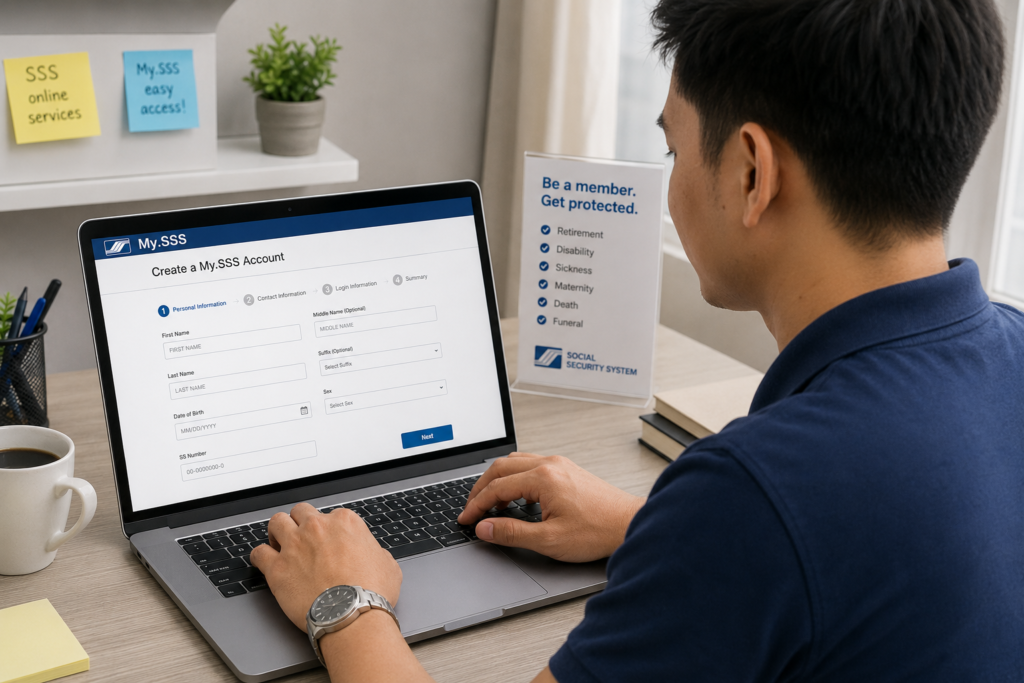
Step 3: Fill Out the Demographic Information
Enter your personal information carefully:
- Your 10-digit SSS Number.
- Your full name (First Name, Middle Name, Last Name). If your SSS record has no middle name, leave it blank.
- Your exact date of birth (MM/DD/YYYY).
- Your active email address (double-check the spelling).
Check the box to accept the Terms of Service and complete the captcha challenge.
Step 4: Select Your Verification Option
Choose the verification method that matches the SSS-registered credential you have on hand. For example, if your mobile number hasn’t changed since you first got your SSS number, select “Mobile Number Registered in SSS” and enter it. If you choose “Transaction Number,” enter the transaction details from your latest receipt.
Step 5: Submit the Registration Form
After filling out the form, click “Submit”. The system will process your details. If the information matches their database, a confirmation screen will appear informing you that an activation email has been sent.
Step 6: Activate Your Account via Email
Open your email inbox and look for a message from SSS (usually titled “My.SSS Portal Account Activation”). Open the email and click the activation link. Remember: This link expires in 120 hours. If you do not see the email, check your spam or junk folder.
Step 7: Create Your Password
The activation link will take you to a page where you must set up your account password. Choose a strong password containing uppercase letters, lowercase letters, numbers, and special characters. Once confirmed, you can use your SSS Number and this password to log in at the member portal homepage.
Fees and SSS Contributions Explained
Creating and managing your My.SSS account online is 100% free. However, to keep your membership active and qualify for benefits and loans, you must pay regular monthly contributions.
For 2026, the SSS contribution rate is set at 14% of the Monthly Salary Credit (MSC). The minimum MSC is Php 4,000, and the maximum MSC is Php 30,000.
| Membership Category | Who Pays the 14% Contribution? |
|---|---|
| Employed Members | Split between the Employer (9.5%) and the Employee (4.5%). The employee’s share is automatically deducted from their monthly pay. |
| Self-Employed / Voluntary | Paid entirely (14%) by the member based on their declared monthly earnings. |
| OFW Members | Paid entirely (14%) by the member, with a mandatory minimum Monthly Salary Credit of Php 8,000. |
Paying these contributions keeps you eligible for salary loans, sickness benefit claims, and your future retirement pension. You can generate your mandatory Payment Reference Number (PRN) directly in your new My.SSS portal dashboard and pay via online banking, GCash, Maya, or SSS payment centers.
Frequently Asked Questions
What should I do if my My.SSS activation link has expired?
The activation link sent to your email is only valid for 120 hours (5 days). If you miss this window, the link will no longer work. You will need to repeat the online registration process from Step 1 to generate a new email and link.
The system says “User ID/Email already exists” when I register. What does this mean?
This error message indicates that your SSS number or email address is already linked to an active My.SSS account. If you forgot your login details, return to the login page and click “Forgot User ID or Password” instead of trying to register again. If you did not create the account, visit an SSS branch to request a reset.
Can I register for My.SSS using my National ID?
While you cannot use your National ID number as a substitute for your 10-digit SSS number, your National ID is a valid primary ID that you can bring to an SSS branch to update your member record (such as registering a new mobile number or email address) so you can successfully complete your online portal registration. Learn more about National ID Requirements.
I don’t have access to my registered mobile number or email. How do I register?
If the contact details on your SSS record are outdated, the online verification step will fail. You must first update your contact information by filing a Member Data Change Request (Form E-4). You can submit this form at your nearest SSS branch along with two valid IDs. Once SSS updates your records with your new email and mobile number, you can complete the online registration.
Official Resources
Ensure you are accessing official channels when entering your personal information and contribution payments:
- Official SSS Member Portal Login and Registration
- SSS Main Website (For SSS Circulars and Contribution Guides)
- PhilSys Verify Portal (For National ID QR Code Checks)
Conclusion
Creating a My.SSS account online is the most effective way to take control of your social security benefits in the Philippines. By setting up your profile, you eliminate the need to visit SSS offices for basic tasks, allowing you to track your contributions, generate PRNs, and apply for salary loans directly from your home.
The registration process is straightforward if you prepare your SSS Number, an active email address, and verify your details carefully. Be sure to select a verification option that matches your current SSS records, check your inbox for the activation link, and complete your registration before the link expires.
Once registered, make it a habit to log in to the portal periodically to monitor your contributions. This ensures your employer is remitting your premiums on time, helping you secure your eligibility for maternity, sickness, loan benefits, and a stable retirement pension when the time comes.
Disclaimer
PublicServicesDesk.com is an independent informational website and is not affiliated with, endorsed by, or operated by the Social Security System (SSS) or the Philippine Government. Information is provided for general educational purposes only and may change over time. Always verify important details through official SSS channels before submitting applications or making payments.